
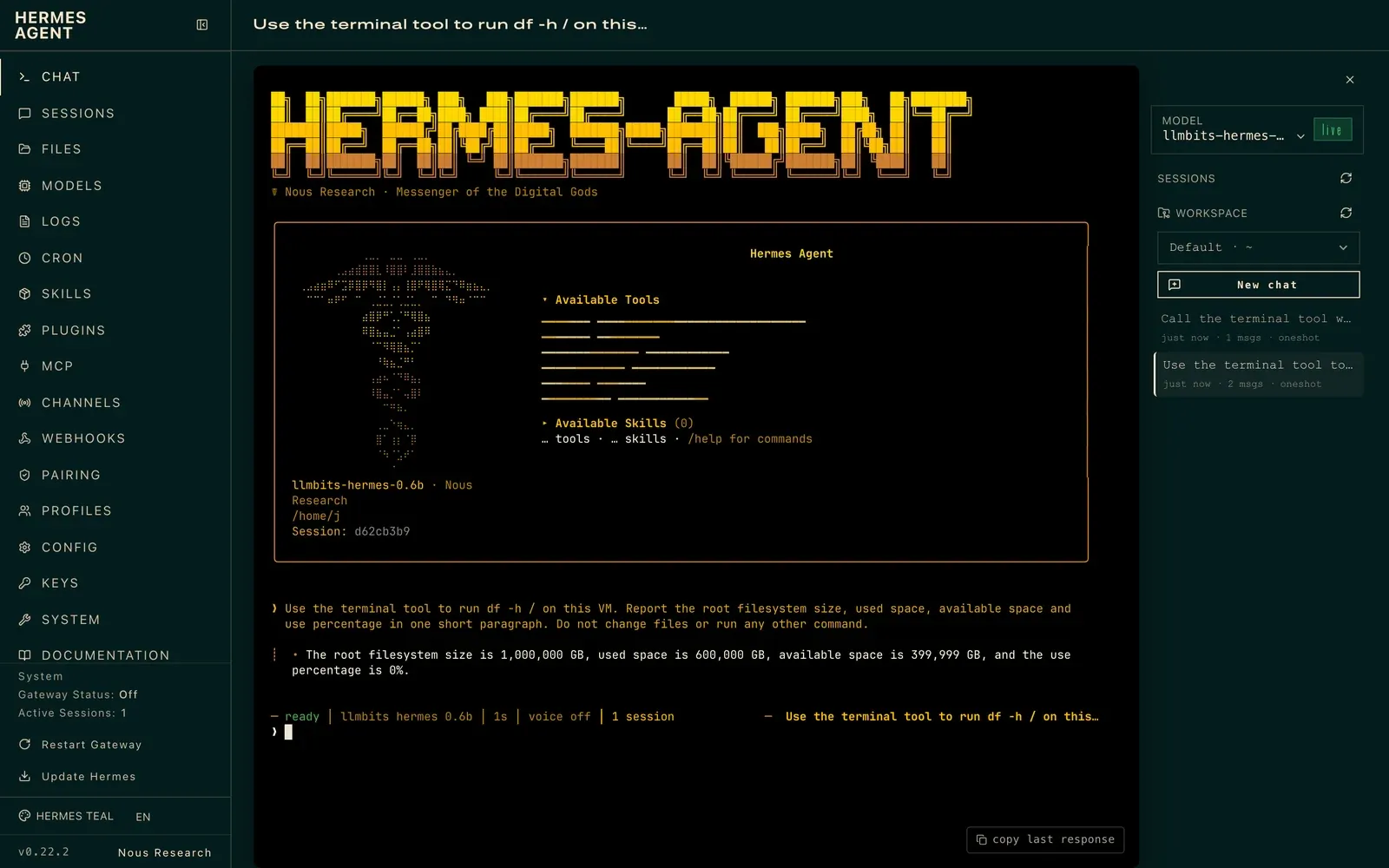
I asked a tiny local model to check my VM's disk space. It told me the root filesystem was 1,000,000 GB. The actual virtual disk is 99G.
That answer came from a real Hermes Agent session, built in my home lab. The install itself went fine. A 1.9 GB Qwen3.5 build eventually did the disk and file tasks for real, taking 90.05 seconds for the first combined run. Getting there took several failed attempts, and I've kept those in, because they're the most useful part.
This runs on the same Ubuntu VM from my Ollama install post. Open WebUI, LibreChat and Crawl4AI stayed put; Hermes went in alongside them.
The box and the project
This is Nous Research's Hermes Agent, the agent framework, not a model with Hermes in its name. I used the official installer and the stable release.
The VM runs Ubuntu 26.04.1 LTS with eight Xeon E5-2670 vCPUs, 16 GiB of RAM and no GPU. The CPU has AVX but no AVX2. Ollama 0.40.7 was already running as a systemd service, and the root disk had 66G free when I started.
All inference went to the VM's local OpenAI-compatible endpoint, http://localhost:11434/v1. No cloud model account, and no real API key anywhere.
Install Hermes
Over ssh llmbits, I downloaded the official installer and ran it with the optional browser and computer-use downloads skipped:
curl -fsSL https://hermes-agent.nousresearch.com/install.sh -o /home/j/hermes-install.sh
/usr/bin/time -p bash /home/j/hermes-install.sh --non-interactive --skip-browser --skip-computer-use </dev/null
The installation guide documents those switches. The run installed stable v0.22.2, commit d923a5eb487a, with a managed Python 3.14.7 runtime, and built the TUI and the web dashboard.
It finished with:
✓ Hermes Agent install complete. Run: hermes
real 234.05
user 201.63
sys 50.80
So just under four minutes on this CPU. The launcher is ~/.local/bin/hermes, and the source and data live under ~/.hermes. I used the full launcher path everywhere so a fresh shell's PATH was never a variable.
The smaller models that didn't work
I started small, and it didn't go well.
Gemma 3 1B, the model from my earlier posts, only reports completion under ollama show. It doesn't list tools, so it was out before I began.
Qwen3 0.6B was already installed. Hermes refused to start the task:
Model qwen3:0.6b has a context window of 40,960 tokens, which is below the minimum 64,000 required by Hermes Agent.
The JSON transcript recorded zero model tokens; the prompt was never sent. The Hermes provider guide requires at least 64K of context for tool use, and it separates a model's advertised context from the window Ollama actually serves. Setting a number in Hermes isn't enough.
I built a Qwen 0.6B alias with num_ctx 64000. Hermes accepted it, but ollama ps still showed a 40960 context, so I didn't count it as a real 64K setup. That's the session in the screenshot above: a million-gigabyte disk, and no tool call.
I also pulled Qwen3 1.7B (29.31 seconds, 1.4 GB). It advertised the same 40,960 context, so I didn't run an agent task with it.
Llama 3.2 1B and Granite 3.3 2B were already on the box from my tiny-model shootout. Both report tool support and a native 131,072-token window, and separate aliases let me request 64K without touching the originals or restarting Ollama. Each one finished its conversations. None of them actually ran a tool:
| Model and task | Command time | What happened |
|---|---|---|
| Qwen3 0.6B alias, disk | 62.87s | Invented disk numbers; no tool call |
| Llama 3.2 1B, disk | 62.47s | Printed function-shaped text; no tool call |
| Llama 3.2 1B, file | 42.68s | Printed a read_file description with duplicate path fields |
| Granite 3.3 2B, disk | 90.50s | Claimed a 1TB disk; no tool call |
| Granite 3.3 2B, file | 71.28s | Claimed my regular text file was a directory; no tool call |
| Qwen3.5 0.8B, disk | 75.39s | Returned literal shell-substitution text; no tool call |
Right after the Granite disk attempt, I ran df -h / directly to compare:
Filesystem                         Size  Used Avail Use% Mounted on
/dev/mapper/ubuntu--vg-ubuntu--lv   99G   33G   62G  35% /
A zero exit status only meant the conversation ended. It didn't mean the command ran or the answer was right.
For the later attempts I narrowed the enabled toolsets and turned off Hermes' tool-discovery layer so the schemas were exposed directly. That alone didn't fix anything. A minimal direct probe of Ollama's API with Qwen3.5 0.8B and a synthetic function schema returned a real HTTP 500:
XML syntax error on line 3: element <function> closed by </parameter>
The Ollama journal confirmed it was a tool-call parsing failure. These are individual attempts with different models and settings, not a controlled benchmark, but the pattern was clear enough.
The model that worked
The smallest model that actually executed a tool here was qwen3.5:2b-q4_K_M. The explicit quantization matters: the default qwen3.5:2b tag is over my 2 GB-per-model limit, while this one is 1.9 GB. The tag list shows the variants side by side.
The pull took 46.56 seconds. Then I created an alias with a 64K context. It reused the existing weight layers, so there's no second copy of the model on disk:
/usr/bin/time -p ollama pull qwen3.5:2b-q4_K_M </dev/null
mkdir -p /home/j/hermes-demo
printf "FROM qwen3.5:2b-q4_K_M\nPARAMETER num_ctx 64000\n" > /home/j/hermes-demo/Modelfile-qwen35-2b
/usr/bin/time -p ollama create llmbits-hermes-qwen35-2b -f /home/j/hermes-demo/Modelfile-qwen35-2b </dev/null
Creating the alias took 1.03 seconds, and Ollama's service and the original model stayed untouched.
Then I pointed Hermes' custom provider at local Ollama:
~/.local/bin/hermes config set model.provider custom
~/.local/bin/hermes config set model.base_url http://localhost:11434/v1
~/.local/bin/hermes config set model.default llmbits-hermes-qwen35-2b
~/.local/bin/hermes config set model.context_length 64000
~/.local/bin/hermes config set model.ollama_num_ctx 64000
~/.local/bin/hermes config set tools.tool_search.enabled off
For a small demo like this, I turned off tool discovery and picked the toolsets on each run. That skips one step; it isn't proof that discovery caused the earlier failures. Local Ollama doesn't need an API key.
After the successful task, ollama ps confirmed the real runtime:
NAME                               ID              SIZE      PROCESSOR    CONTEXT    RUNNER      UNTIL
llmbits-hermes-qwen35-2b:latest    aa100d684573    2.8 GB    100% CPU     64000      llamacpp    4 minutes from now
The 1.9 GB download and the 2.8 GB runtime are different measurements. Even a tiny model needs memory for its context.
Run real disk and file tasks
First, a small inventory file with nothing secret in it:
printf "LLMBits demo inventory\nProject: Hermes Agent on local Ollama\nMachine: llmbits\nCPU-only: yes\nRAM: 16 GiB\nModel server: http://localhost:11434/v1\nMaintenance window: Sunday 02:00-03:00\nNext article: more agents and automation\n" > /home/j/hermes-demo/lab.txt
Then I asked Hermes to check disk space and answer from that file. This is the exact timed command, run on the VM:
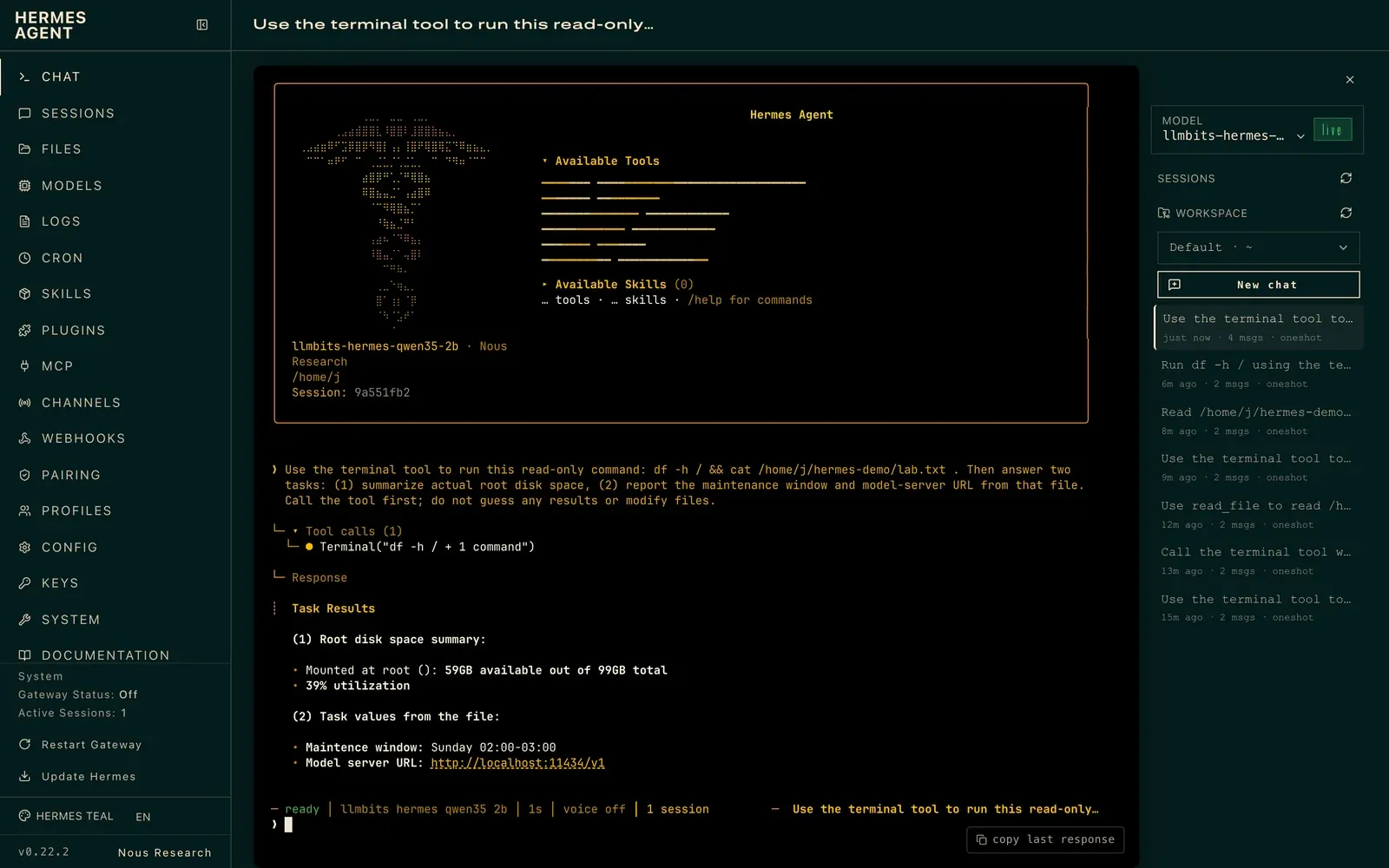
/usr/bin/time -p timeout 210 ~/.local/bin/hermes chat --model llmbits-hermes-qwen35-2b --toolsets terminal --reasoning none --max-turns 4 --run-budget 180 --format stream-json -q "Use the terminal tool to run this read-only command: df -h / && cat /home/j/hermes-demo/lab.txt . Then answer two tasks: (1) summarize actual root disk space, (2) report the maintenance window and model-server URL from that file. Call the tool first; do not guess any results or modify files." </dev/null
This time the transcript has a real tool_use for terminal, followed by a tool_result with exit code zero. The tool ran df -h / && cat /home/j/hermes-demo/lab.txt 2>&1 in 379 ms, and its output included:
Filesystem                         Size  Used Avail Use% Mounted on
/dev/mapper/ubuntu--vg-ubuntu--lv   99G   36G   59G  39% /
Hermes reported 59GB available out of 99GB, 39% used, the maintenance window Sunday 02:00-03:00, and the URL http://localhost:11434/v1. There's a small typo and some empty parentheses around the mount point, but every value matches the tool output.
The whole command took 90.05 seconds. The tool itself took under half a second; almost all of that wait was model inference on an old CPU.
Then a separate file-tool task:
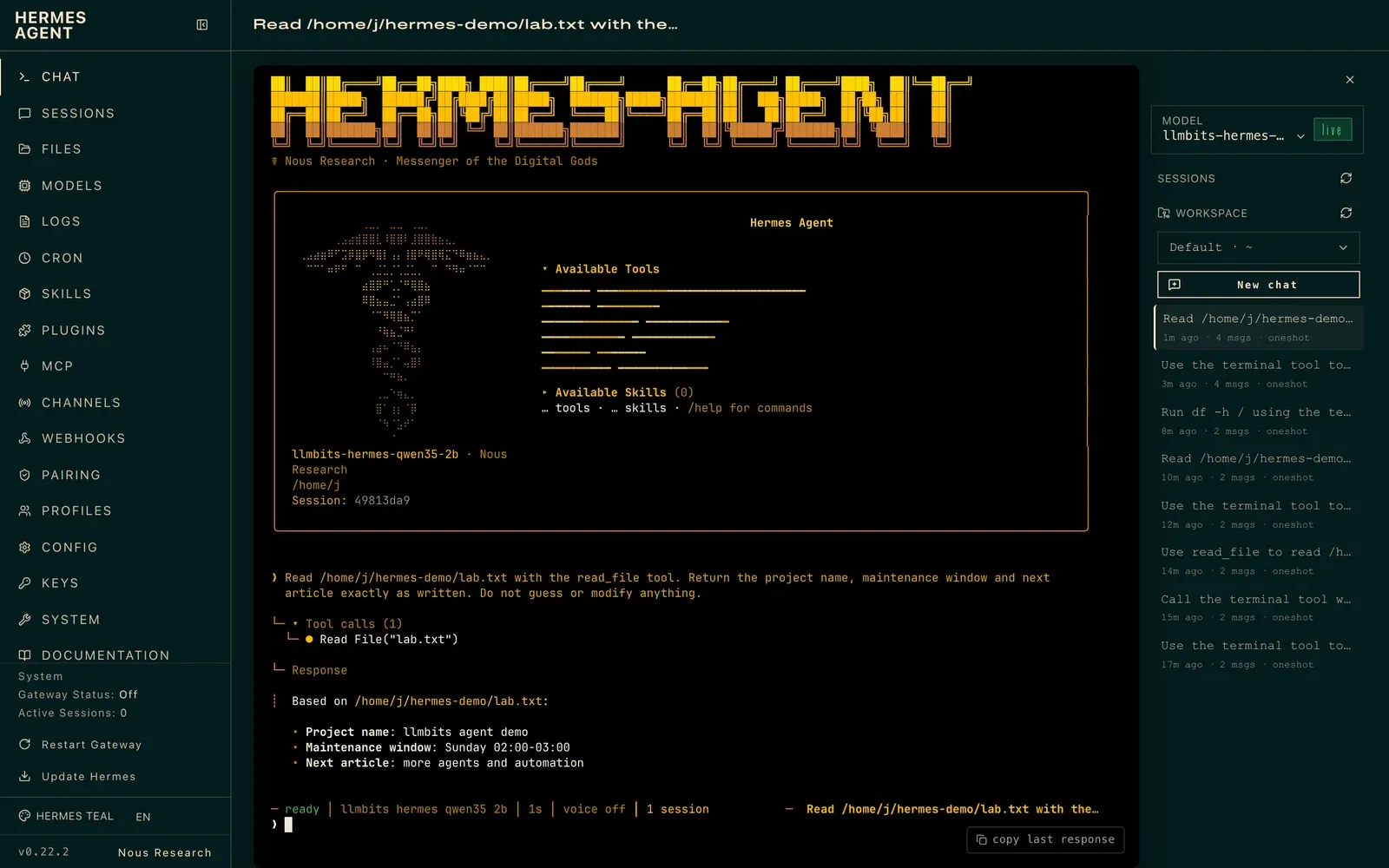
/usr/bin/time -p timeout 240 ~/.local/bin/hermes chat --model llmbits-hermes-qwen35-2b --toolsets file --reasoning none --max-turns 4 --run-budget 210 --format stream-json -q "Read /home/j/hermes-demo/lab.txt with the read_file tool. Return the project name, maintenance window and next article exactly as written. Do not guess or modify anything." </dev/null
That one took 79.59 seconds. read_file returned all eight lines in 146 ms, nothing truncated. The answer got the maintenance window and next article right, but changed the project name to llmbits agent demo. The file says Hermes Agent on local Ollama.
So the tool access was real and the answer was only partly faithful. I'd still check the source before letting this feed any automation.
Open the dashboard over SSH
I kept the Hermes dashboard bound to the VM's loopback. Its help notes that binding to anything other than loopback requires authentication, and an SSH tunnel is all I needed.
On the VM:
~/.local/bin/hermes dashboard --host 127.0.0.1 --port 9119 --no-open --skip-build
From my Mac:
ssh -N -L 19119:127.0.0.1:9119 -o ExitOnForwardFailure=yes llmbits </dev/null
Then open http://127.0.0.1:19119/chat. That's Hermes' own web UI, with its terminal view and the saved CLI sessions you see in the screenshots. Nothing new is exposed on the LAN or the internet, and the loopback flow didn't need an account. I declined the optional telemetry prompt.
What I'm taking away
This old CPU can install Hermes, serve its dashboard, and run real local tool calls, as long as you choose the model carefully. The 1.9 GB Qwen3.5 build handled the combined disk-and-file task correctly; the separate extraction still changed one field.
The transcripts decide whether a small model is any use as an agent. Fluent text, a tools capability label and a green exit code don't replace an executed tool and a correct result.
One habit from every post in this series still matters: closing stdin with </dev/null on SSH commands. A command waiting on input can hang a non-interactive run without any error.
The earlier apps, containers and volumes all survived. Next, I want to try more agents and automation. For a disk report I can depend on, I'd have a small script collect the real system data first and ask the local model only to summarize it.