

Tonight I installed Ollama on a fresh Ubuntu VM built in my home lab, pulled Gemma 3 1B, and ran it on CPU only. No GPU anywhere in the chain. Below are the exact commands, the output, and two snags I hit.
Short version: one install command, one pull, and a 1B model answering at about 25 tokens per second on a pair of 2012-era Xeons.
The lab setup
- Host: Proxmox VE 9.2 on dual Xeon E5-2670 (32 threads, ~126 GB RAM). No GPU used for this one.
- VM: Ubuntu 26.04.1 LTS, 8 vCPU, 16 GB RAM, 100 GB disk on SSD storage, cloud-init, key-based SSH.
- Safety net: I took a Proxmox snapshot of the clean base before installing anything, so I can roll back and run this whole thing again from zero.
That's plenty for a tiny demo model. This post is about the plumbing: install, service, model, API.
Proxmox tip: set the CPU type to host
These older Xeons support AVX but not AVX2. Proxmox's default kvm64 CPU type hides AVX from the guest entirely, and Ollama's CPU inference leans on it. So before first boot I set Hardware → Processors → Type to host (or from the shell: qm set <vmid> --cpu host).
Quick check from inside the VM. On mine this returns 8, one per vCPU:
grep -c -w avx /proc/cpuinfoSide quest: Ubuntu only used 30 GB of my 102 GB disk
The Ubuntu installer laid down a 30 GB partition with a 15 GB root logical volume and left the rest of the disk unused. Docker images for the next posts would fill that fast, so I grew it live, no reboot:
sudo growpart /dev/sda 3 && sudo pvresize /dev/sda3 && sudo lvextend -r -l +100%FREE /dev/ubuntu-vg/ubuntu-lvCheck your own device and VG names with lsblk first. Mine ended up with about 99 GB on root.
Step 1: Install Ollama
The official install script is one line, and it handles the binary, a dedicated ollama user, and a systemd service:
curl -fsSL https://ollama.com/install.sh | sh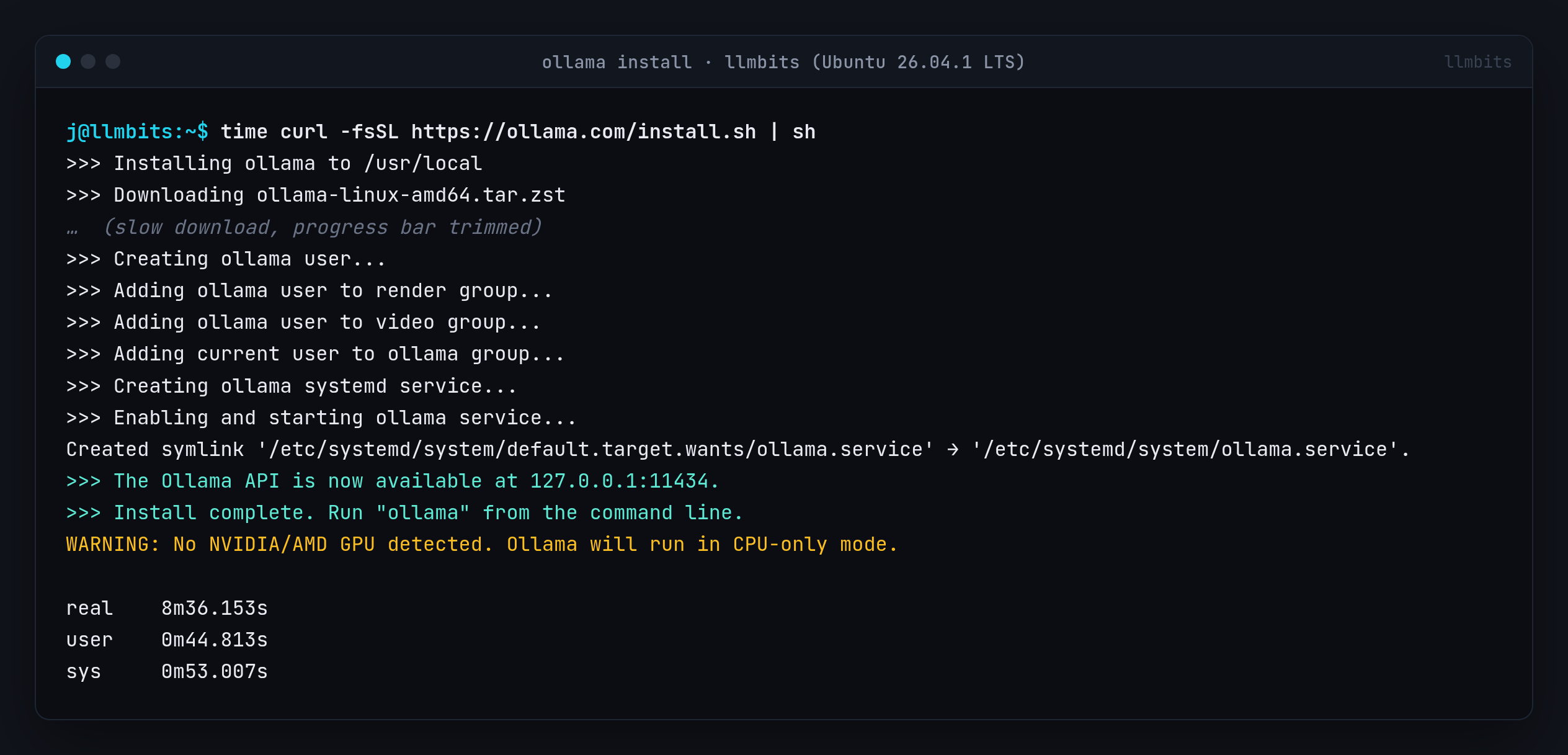
Two notes from that output:
- It took 8 minutes 36 seconds, and nearly all of that was a slow download of
ollama-linux-amd64.tar.zst. The actual install steps fly by. - "WARNING: No NVIDIA/AMD GPU detected. Ollama will run in CPU-only mode." That's expected, since this whole build is CPU only.
Step 2: Check the service and the API
systemctl status ollama
curl http://localhost:11434/api/version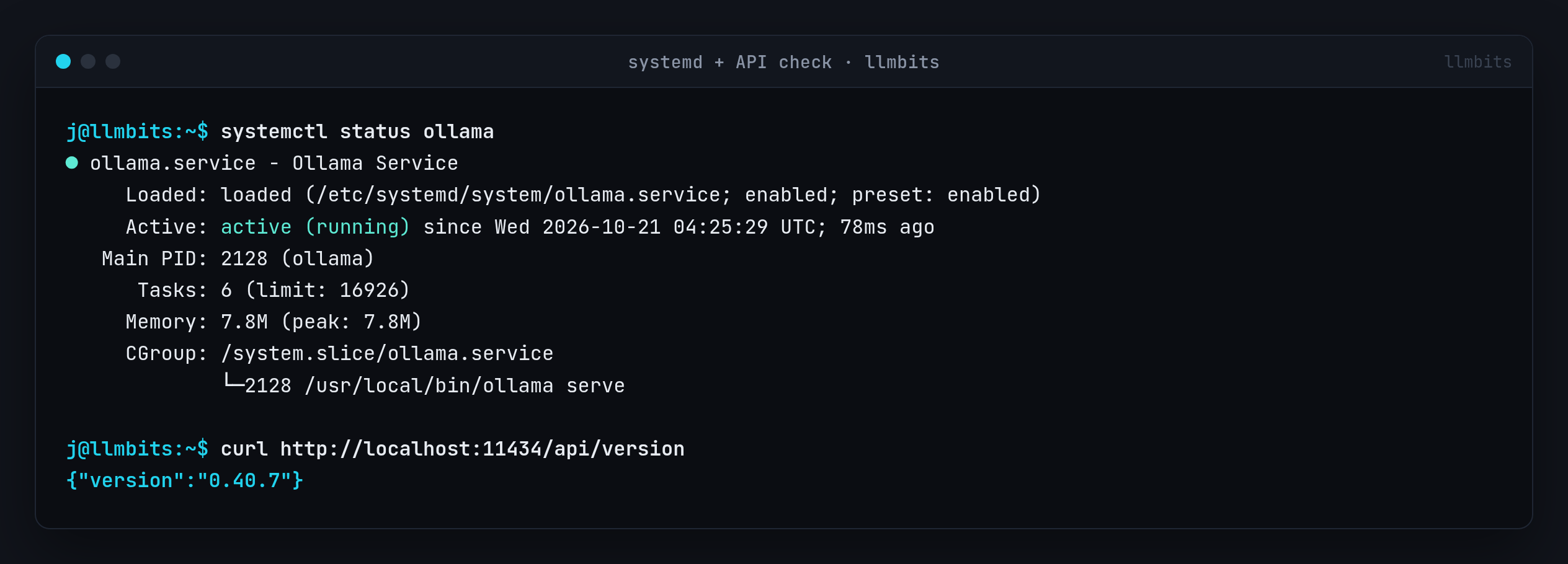
I ran ollama --version the instant the script finished and got Warning: could not connect to a running Ollama instance plus client version is 0.40.7. The service had been up for 78 milliseconds. Give it a second and the API answers fine.
The API binds to 127.0.0.1:11434 by default, which comes up again in the next post.
Step 3: Pull Gemma 3 1B
I wanted something tiny that still feels like a real model. Gemma 3 1B is about 1B parameters (999.89M), Q4_K_M quantized, 806 MB on disk, with a 32K context window.
ollama pull gemma3:1b
ollama list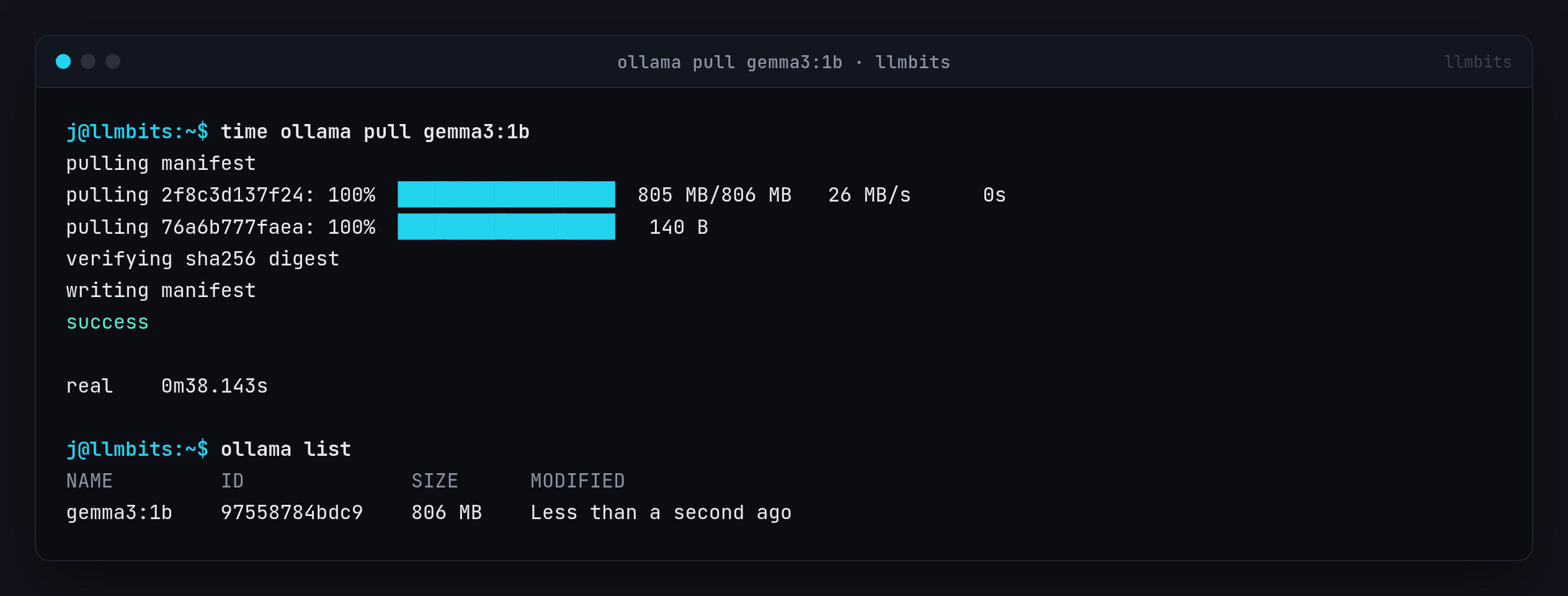
Step 4: Run it with --verbose
--verbose prints timing stats after the answer, which is exactly what you want on CPU:
ollama run gemma3:1b --verbose "In two sentences, what is a home lab?"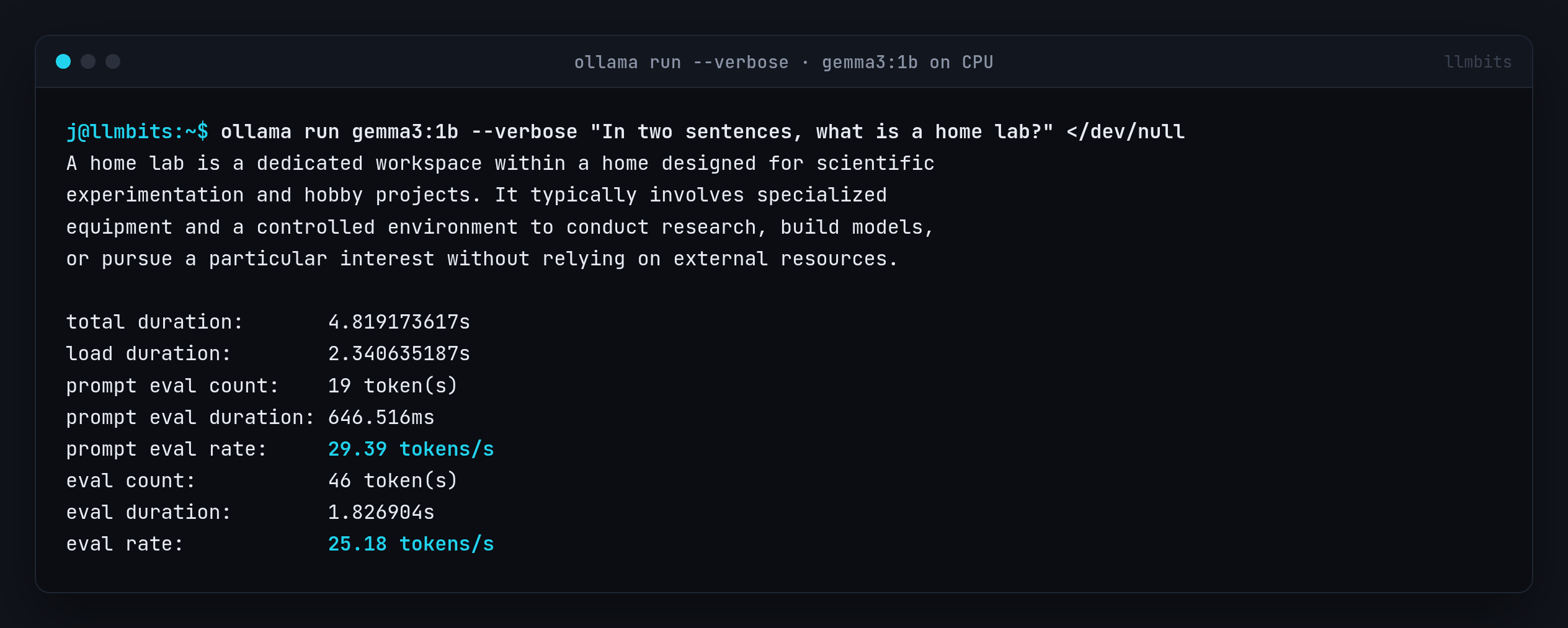
The numbers on 8 vCPUs of an E5-2670:
- Load: 2.3 s (first run, model loading into RAM)
- Prompt eval: 29.39 tokens/s
- Generation: 25.18 tokens/s
- Total: 4.8 s for a 46-token answer
Gotcha: ollama run hung over SSH
I was driving the VM with one-shot SSH commands, and the first time I fired ollama run that way it just sat there. No answer, no error. It was waiting on stdin, which a non-interactive SSH session never closes. Redirecting stdin from /dev/null fixed it:
ssh llmbits 'ollama run gemma3:1b --verbose "In two sentences, what is a home lab?" </dev/null'(llmbits is just my SSH alias for the VM.) Same trick works in scripts, cron jobs and CI.
Gemma's answer was confidently wrong
Read the screenshot again. According to Gemma 3 1B, a home lab is "a dedicated workspace within a home designed for scientific experimentation," complete with "specialized equipment and a controlled environment to conduct research." Close, but it's describing a lab coat, not a rack.
I'm leaving it in because it's the most useful result in this post. A 1B model is great for demos, plumbing, testing configs and wiring up APIs. I don't use it for facts. This answer was fluent, fast and wrong.
Step 5: What it costs to run, and the API
ollama ps
ollama show gemma3:1b
free -h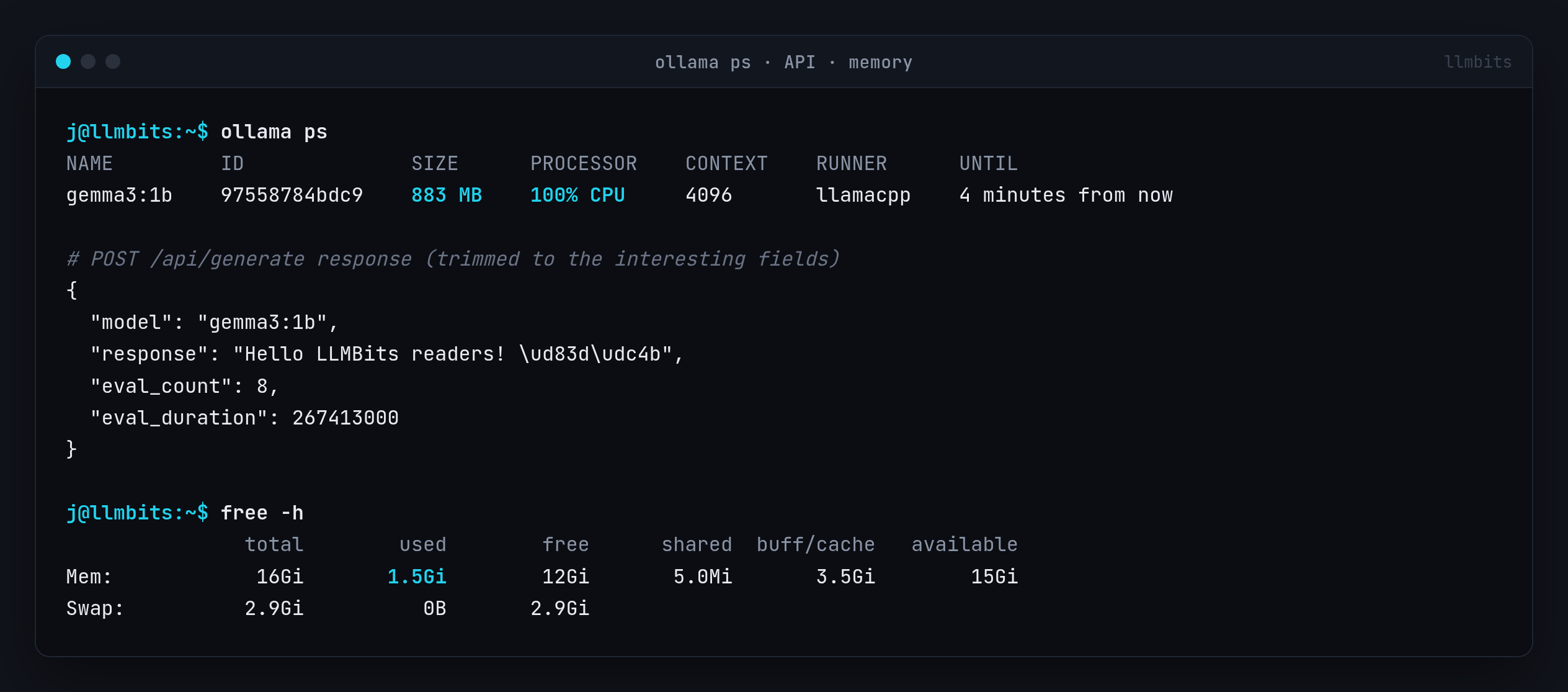
ollama ps: 883 MB loaded, 100% CPU, context 4096, llamacpp runner, unloads itself after a few idle minutes.ollama show: gemma3 architecture, 999.89M parameters, 32768 context length, Q4_K_M, defaults of temperature 1, top_k 64, top_p 0.95.free -h: 1.5 GiB used on the whole VM with the model loaded.
Everything Open WebUI and friends will do goes through the REST API, so I tested that too. This is the exact call I made:
curl -s http://localhost:11434/api/generate -d '{"model":"gemma3:1b","prompt":"Say hello to LLMBits readers in one short sentence.","stream":false}'I piped the JSON through a small Python one-liner to keep only model, response, eval_count and eval_duration. That trimmed response is in the screenshot above: "Hello LLMBits readers! 👋" in 8 tokens.
Cheat sheet
# Install (CPU-only is fine)
curl -fsSL https://ollama.com/install.sh | sh

# Check the service and API
systemctl status ollama
curl http://localhost:11434/api/version

# Pull and run a tiny model
ollama pull gemma3:1b
ollama list
ollama run gemma3:1b --verbose "In two sentences, what is a home lab?"

# Over non-interactive SSH or in scripts: close stdin
ollama run gemma3:1b "Hello" </dev/null

# What's loaded, and what it costs
ollama ps
ollama show gemma3:1b
free -h
What's next
Ollama is running as a service with a model loaded and the API answering on port 11434. Next up, I'm hooking Open WebUI up to this exact Ollama install so it gets a proper chat interface, then LibreChat after that. It'll run on the same VM with the same tiny model.
Want the Open WebUI post when it lands? Subscribe free and it'll show up in your inbox.