

My Ollama VM has eight vCPUs, 16 GiB of RAM, and no GPU. The CPU is an older Xeon E5-2670 with AVX but no AVX2. It's the same Ubuntu VM from my Ollama install post, built in my home lab, and the same one now running Open WebUI, LibreChat and Crawl4AI.
So far every post has used Gemma 3 1B. I wanted to see what other small models could actually do on this box. I kept every model under 2 GB, ran four prompts three times per model, and saved all 60 answers. The speed numbers are useful, and so are the confident mistakes.
The short version
- Fastest:
qwen3:0.6b, 32 to 36 generated tokens/s on every prompt. - Only clean JSON with the values I wanted:
smollm2:360m, the smallest by parameter count and the slowest of the five. - Only model to get the server-count question right (2 of 3 runs):
llama3.2:1b. - Most relevant "what is a home lab" answer:
granite3.3:2b. - None of them followed "exactly 5 lines of Python," even though every function worked.
The five models
I tested gemma3:1b, llama3.2:1b, qwen3:0.6b, smollm2:360m, and granite3.3:2b on Ollama 0.40.7, running as a systemd service on Ubuntu 26.04.1 LTS.
Gemma was already installed; I re-ran its pull as a check and downloaded the other four. Gemma's check took 0.63 seconds; Llama took 30.55 seconds, Qwen 14.60, SmolLM2 18.99, and Granite 32.58. Those are the VM's time -p wall times, including verification.
I considered Gemma 3n E2B, but its Ollama listing is a 4.46B-parameter model plus a vision projector, well past my 2 GB cap. "E2B" means an effective 2B, not a 2 GB download. Granite 3.3 2B fit instead.
One more wrinkle: these tags use different quantizations. Llama is Q8_0, SmolLM2 is F16, and the other three are Q4_K_M. Live ollama ps showed the llamacpp runner for all five. I'm comparing these installed packages as they ran on this VM, not isolating architecture or quantization.
Give the CPU some room
I stopped the three web apps from the previous posts before pulling and benchmarking. Every SSH command closes stdin so nothing can sit waiting for input:
ssh -o BatchMode=yes -o ConnectTimeout=15 llmbits 'sudo docker stop open-webui LibreChat crawl4ai </dev/null' </dev/null
My first Docker inventory returned permission denied as my user; sudo docker fixed that. I left the MongoDB, Meilisearch, vector database and RAG dependencies running. Two one-second CPU samples after stopping the web apps showed 100% idle.
Crawl4AI exited with code 137 on docker stop. I noted it and checked its health after restarting it later. Nothing was deleted.
Then the model pulls:
ssh -o BatchMode=yes -o ConnectTimeout=15 llmbits '/usr/bin/time -p ollama pull gemma3:1b </dev/null' </dev/null
ssh -o BatchMode=yes -o ConnectTimeout=15 llmbits '/usr/bin/time -p ollama pull llama3.2:1b </dev/null' </dev/null
ssh -o BatchMode=yes -o ConnectTimeout=15 llmbits '/usr/bin/time -p ollama pull qwen3:0.6b </dev/null' </dev/null
ssh -o BatchMode=yes -o ConnectTimeout=15 llmbits '/usr/bin/time -p ollama pull smollm2:360m </dev/null' </dev/null
ssh -o BatchMode=yes -o ConnectTimeout=15 llmbits '/usr/bin/time -p ollama pull granite3.3:2b </dev/null' </dev/null
All five tags together took 4.6G in Ollama's model directory per du -sh. The tables below use each tag's exact size from the API, in decimal GB.
Four prompts, three runs each
1. Home lab
In two sentences, what is a home lab?
2. JSON extraction
Return only valid JSON with keys name (string), port (number), enabled (boolean). Extract from: "Jaime enabled the Ollama service on port 11434."
3. Reasoning
I have 3 servers. I buy 2 more, then shut down 2 of the original servers. How many servers do I own, and how many are running? Assume all others are running. Answer briefly.
4. Python
Write a Python function named count_even(numbers) that returns how many integers in numbers are even. Output only the function, exactly 5 lines of Python, with no Markdown.
For the extraction task I expected {"name":"Jaime","port":11434,"enabled":true}. The key name could have been more explicit: it does not say “person's name,” so selecting Ollama is a schema ambiguity as well as a mismatch with my intended extraction. Extra prose and Markdown fences still fail the clear instruction to return only valid JSON.
For the server question, the answer is five owned, three running. Switching a server off does not remove it from the rack. For Python, I checked both the function's behavior and the separate instruction to produce exactly five lines.
I used Ollama's generate API with streaming off, thinking off, temperature 0.2, a 256-token output cap, and seeds 101, 102, and 103 for the three repetitions. I did not enable JSON mode or enforce a schema; I wanted to see whether each model followed the prompt itself.
I left num_ctx and thread count unset. Every loaded model reported a 4096-token context and 100% CPU, with zero VRAM allocation. Qwen's results here are specifically for thinking disabled.
Before every measured request, I unloaded the model. These are the VM-side commands from the transcript. First the unload:
curl --fail-with-body --silent --show-error --max-time 580 http://127.0.0.1:11434/api/generate -H 'Content-Type: application/json' -d '{"model":"gemma3:1b","keep_alive":0}' </dev/null
Here is the first measured request, extracted from the same command log:
curl --fail-with-body --silent --show-error --max-time 580 http://127.0.0.1:11434/api/generate -H 'Content-Type: application/json' -d '{"model":"gemma3:1b","prompt":"In two sentences, what is a home lab?","stream":false,"think":false,"keep_alive":"5m","options":{"num_predict":256,"temperature":0.2,"seed":101}}' </dev/null
My runner script repeats that for all four prompts and all five models, saves every full API response, and records ollama ps after each generation. One CSV row per measured response, 60 in total.
Unloading avoids reusing the previous request's prompt cache. The operating system's file cache stays warm, so the recorded load times are fresh runner loads, not cold-disk loads. I ran models in a fixed order, one request at a time; I did not inspect or control other workloads on the Proxmox host.
The measured speeds
| Model | Disk GB | Loaded GB | Load s (median 12) | Prompt tok/s (median 12) |
|---|---|---|---|---|
| gemma3:1b | 0.806 | 0.883 | 2.603 | 51.35 |
| llama3.2:1b | 1.321 | 1.523 | 3.263 | 47.04 |
| qwen3:0.6b | 0.523 | 1.021 | 2.706 | 53.31 |
| smollm2:360m | 0.726 | 0.922 | 2.096 | 18.45 |
| granite3.3:2b | 1.545 | 1.955 | 2.991 | 34.97 |
| Model | Home lab tok/s | JSON tok/s | Reasoning tok/s | Python tok/s |
|---|---|---|---|---|
| gemma3:1b | 28.05 | 26.40 | 26.98 | 25.58 |
| llama3.2:1b | 22.97 | 22.85 | 24.08 | 23.31 |
| qwen3:0.6b | 35.72 | 32.82 | 32.21 | 32.74 |
| smollm2:360m | 13.49 | 13.85 | 13.72 | 13.70 |
| granite3.3:2b | 14.91 | 14.89 | 14.95 | 14.72 |
Each of the four generation columns is a median of three runs. The load and prompt-evaluation columns summarize all twelve requests per model. Loaded GB is Ollama's reported model allocation, not total VM RAM or process RSS.
The rates come from each response's token count divided by its evaluation duration. I calculated each run's rate first, then took the median. Different tokenizers produce different token counts for the same text, which limits comparisons across models.
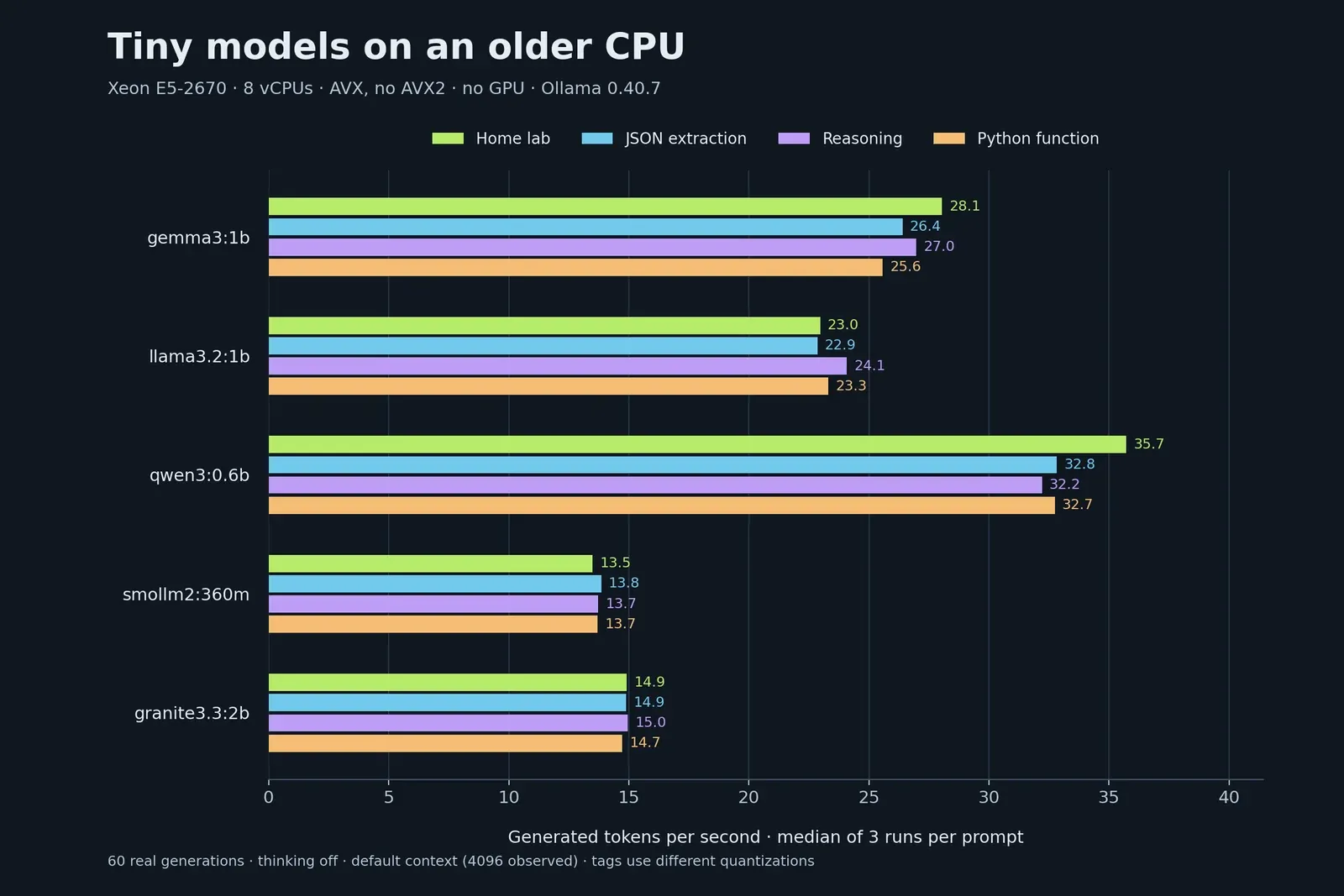
Qwen led all four prompts, with medians of 32.21 to 35.72 tokens/s. SmolLM2, despite the smallest parameter label in this group, came last at 13.49 to 13.85 tokens/s. Its F16 package was also larger on disk than Qwen’s Q4_K_M package. These results do not isolate quantization as the cause.
Disk size did not predict loaded memory either: Qwen’s 0.523 GB tag reported about 1.021 GB loaded, while Gemma’s 0.806 GB tag reported 0.883 GB loaded.
These numbers are a floor for my expectations on this older lab hardware. They are not a universal lower bound for CPUs, and four short prompts cannot establish a general model ranking.
Read the answers before choosing
| Model | Raw valid JSON | Intended values* | Correct final server counts | Python behavior† | Exactly 5 raw lines |
|---|---|---|---|---|---|
| gemma3:1b | 0/3 | 0/3 | 0/3 | 3/3 | 0/3 |
| llama3.2:1b | 0/3 | 0/3 | 2/3 | 3/3 | 0/3 |
| qwen3:0.6b | 0/3 | 3/3 | 0/3 | 3/3 | 0/3 |
| smollm2:360m | 3/3 | 3/3 | 0/3 | 3/3 | 0/3 |
| granite3.3:2b | 3/3 | 0/3 | 0/3‡ | 3/3 | 0/3 |
*Intended values means Jaime / 11434 / true, inspecting the object inside any wrapper. name was ambiguous in the prompt, so this is a match to my intended schema, not an unqualified factual-error score.
†Python behavior was tested after stripping Markdown fences where present, on empty, all-odd, all-even, mixed zero/negative, and duplicate-value lists. All fifteen snippets passed these five cases; this is not a proof for every input.
‡Granite gave the right 5-total / 3-running calculation, but prefaced it with “4 servers” in all three runs. I counted none as an unambiguous correct answer.
SmolLM2 was the only model to return directly parseable JSON with all my intended values in all three runs. Granite also returned valid JSON, but chose the service name. Qwen selected Jaime correctly inside fenced JSON.
Llama gave the right final server counts twice, then missed on the third run. Gemma, Qwen, and SmolLM2 all gave wrong counts in every repetition. Granite wrote “4 servers” before correctly working out five total and three running; the contradiction appeared in all three answers.
For the broad home-lab definition, Granite stayed closest to a computing lab. The prompt itself did not specify computing, so I did not call the other models’ scientific-lab interpretations false. Qwen answered in one sentence each time despite the two-sentence instruction.
Here's the server question, run 1 for every model, straight from the results:
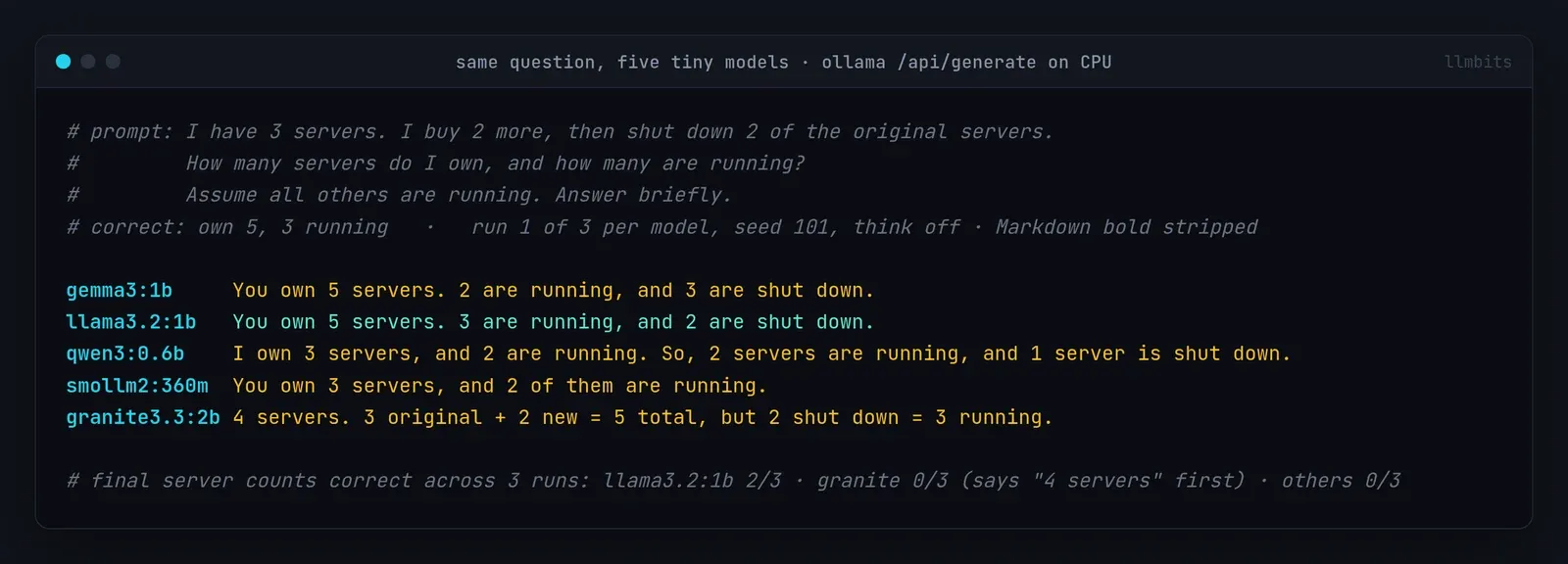
Gemma's "You own 5 servers. 2 are running, and 3 are shut down" sounds certain and is wrong. All three Gemma repetitions gave that same count.
Qwen's first extraction contained the intended values:
```json
{
  "name": "Jaime",
  "port": 11434,
  "enabled": true
}
```
The fences mean the complete response is not directly parseable JSON. That's a problem if the next step is a script calling json.loads, rather than a person reading a chat window. These results do not test Ollama's schema-constrained output mode.
The five-line Python requirement was another useful check: a function can calculate the right result while ignoring the requested shape. I scored behavior and format separately, and kept every untouched answer.
Put the apps back
After the final measurement, I restarted the same three containers:
ssh -o BatchMode=yes -o ConnectTimeout=15 llmbits 'sudo docker start open-webui LibreChat crawl4ai </dev/null' </dev/null
Open WebUI and Crawl4AI came back healthy, and Open WebUI, LibreChat and Crawl4AI's health endpoint all returned HTTP 200. All seven containers that were running before were running again, Ollama was still active, and the benchmark models were unloaded.
I didn't change any port bindings or open anything to the internet. The benchmark talked to Ollama over SSH and the VM's loopback.
What I'd pick on this box
- Chat demos and throughput:
qwen3:0.6b(thinking off). Fastest here, but it fumbled the server question every time. - Structured output for a script:
smollm2:360mdeserves a closer look. It was the only one to return raw, parseable JSON with my intended values, at about 14 tokens/s. - Sticking with Gemma 3 1B for the UI posts was fine for plumbing. It's quick on this CPU, but it was wrong on the server question all three times.
Four short prompts can't pick a general winner, and none of these models was reliable across the board. Speed, format-following and correctness came out as separate results on this box, so I'd test all three before using a tiny model for anything.
What's next
Next I'm putting Hermes Agent on local models to see how they handle an agent workflow. An agent has to run the right tool and use its result, which is a harder test than writing a short answer.